What’s New in Progress Learning: 2026-2027 Product Release & Enhancements
What’s New in Progress Learning: 2026–2027 Product Release & Enhancements
Welcome to the 2026–2027 school year! A new school year brings new opportunities and new ways to make teaching, learning, and school improvement more efficient.
This year, we’re introducing new features and enhancements across Progress Learning that simplify everyday workflows, strengthen assessment security, improve collaboration, and make student data even more actionable. From a refreshed user experience and expanded reporting to new family engagement tools and secure testing capabilities, these updates are designed to help schools and districts spend less time managing technology and more time supporting student success.
Here’s a look at what’s new in Progress Learning for the 2026–2027 school year.
Key Releases and Features at a Glance
Here’s a quick overview of the biggest enhancements arriving this school year:
- Modernized Navigation: A refreshed user interface simplifies daily platform use for teachers while creating a more intuitive experience for students, including early elementary learners.
- Family Connect: A secure parent and guardian portal gives families direct access to assignments, scores, and student learning progress.
- Advanced Testing Controls: Expanded assignment scheduling and secure testing features help schools protect the integrity of digital assessments.
- Collaborative Tools for Educators: Co-teachers, grade-level teams, specialists, and testing coordinators can now monitor assessments together in real time.
- AI-Assisted Authoring: Educators can quickly generate standards-aligned assessment questions in seconds and combine them with our existing item bank.
- More Actionable Reporting and Intervention: New reporting enhancements and streamlined remediation tools help educators quickly identify learning gaps and provide targeted support.
- Content Management: District and school administrators can control access to Premium Assessments, specialized Item Banks, and AI-Assisted Authoring from one central dashboard.
Summer Site Refresh / UI Overhaul
We’ve refreshed the platform’s look and feel with a modernized user interface that improves navigation, usability, and the overall user experience. While the design has been updated throughout the platform, the tools and workflows educators rely on every day remain familiar.
Later this summer, we’ll also introduce an enhanced experience for our youngest learners in grades K–1. These updates are designed to help early learners navigate the platform more independently while creating a simpler, more engaging experience.
New K–1 enhancements include:
- A simpler, more engaging homepage
- Unique icons for each Study Plan tile to support early readers and non-readers
- A more consistent layout across practice activities
You’ll see these updates across teacher dashboards, student-facing activities, and early elementary homepages.
Family Connect
Keeping families connected to classroom learning has never been easier. Family Connect is a new parent and guardian portal that gives families secure visibility into student learning within Progress Learning. Guardians can access information for one or multiple students using a single account, making it easy to stay informed and support learning at home.
With Family Connect, parents and guardians can:
- View upcoming, current, and past-due assignments
- Review scores for completed assignments and activities
- Monitor their student’s active learning progress
- Access classroom instructional materials and content organized by unit and sequence to reinforce schoolwork at home (available with Texas IMRA purchases)
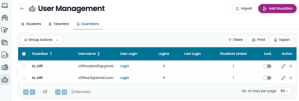
District and school administrators can easily create guardian accounts, import guardian lists, and send welcome emails through School Settings > User Management.
Expanded Assignment Scheduling
Every classroom has its own pacing, and assignment scheduling should support that flexibility.
Assignment scheduling has been expanded to support all digital activity types across the platform, giving teachers greater control over when students can access assignments. These enhancements help educators keep students aligned with local pacing guides while providing additional flexibility for differentiated instruction.
Teachers can now:
- Define assignment access windows with optional start and end times
- Set active start dates and due dates for any assignment
- Customize availability timelines for individual activities within a single Group Assignment
Proctor Mode Feature
Maintaining a secure digital testing environment is more important than ever, and our new Proctor Mode gives schools additional tools to protect assessment integrity.
When Proctor Mode is enabled, students launch their assessment in a secure full-screen environment and receive a notification that they are entering a secure assessment.
If a student exits full-screen mode or attempts to leave the testing window, the assessment immediately locks. The assessment can only be resumed through teacher intervention using Live Monitoring or by entering a custom four-digit PIN. Teachers can enable Proctor Mode within Assignment settings.
Proctor Mode also includes an enhanced monitoring dashboard that allows educators to:
- View student progress in real time
- Monitor active testing sessions
- Identify students who may need assistance
- Unlock student assessments when necessary

Expanded and Enhanced Live Monitoring
Live Monitoring continues to provide teachers and administrators with real-time visibility into active assessment sessions, making it easier to monitor testing progress and support students as they work.
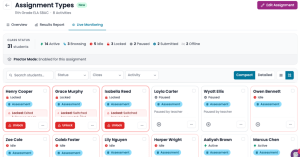
Educators can:
- View which students are actively working
- Monitor assessment progress in real time
- Identify students who may be off task
- Pause or resume student activity with a single click
- Save and exit or discard an active student session
- Submit an assessment on a student’s behalf if needed
NEW: Shared Live Monitoring Access
Teachers can now grant Live Monitoring access to additional educators, including co-teachers, grade-level teams, specialists, testing coordinators, and administrators, even if they aren’t directly associated with the assignment. This shared access makes campus-wide testing, common assessments, and collaborative monitoring easier than ever.
Expanded Text-to-Speech (TTS) Settings
We’ve added a new Readable Passage/Shared Stimulus TTS accommodation setting that gives educators greater control over text-to-speech functionality.
Teachers can now enable or disable voice support specifically for reading passages and shared stimuli while still allowing text-to-speech for questions and answer choices when appropriate. This provides greater flexibility for supporting student accommodations while helping schools meet state testing requirements.
The setting is available within both Student Settings and Assignments.
AI-Assisted Authoring
Creating customized, high-quality assessment items shouldn’t take hours. Our new AI-Assisted Authoring tool helps educators generate draft, standards-aligned questions in seconds directly within the authoring tool.
With AI-Assisted Authoring, educators can:
- Generate Targeted Drafts: Select the subject, domain, standard, and DOK level, then enter a custom prompt to generate a standards-aligned draft question in seconds.
- Customize and Edit: Fine-tune and edit AI-generated questions to perfectly match classroom needs before adding them to an assessment.
- Combine with Existing Item Banks: Merge custom AI-generated questions with Progress Learning’s bank of over 200,000 items to build comprehensive formative and summative assessments.
- Access directly within workflow: Navigate to Assessments > Create Your Own Question and select AI-Assisted Authoring to start creating.
Content Management
Content Management gives district and school administrators one central place to decide which assessments, item banks, and authoring tools teachers can use, and when. Districts can keep settings centralized for consistency across every campus, or let individual schools manage their own. Either way, teachers keep working as usual, and the platform reflects the choices their administrators have made. With Content Management, administrators can:
- Choose Who Manages Settings: District administrators decide, school by school, whether content settings are managed at the district level or by each campus.
- Schedule Premium Assessment Availability: Turn all Premium Assessments on or off at once, or manage a single assessment for your whole district or an individual campus. Set start and end dates, and assessments automatically become available for new assignments on schedule.
- Keep Assessment Content Secure: When an assessment is turned off, teachers can still see that it exists but can’t assign or preview it, so premium test content stays protected until you’re ready to use it.
- Manage AI-Assisted Authoring Access: Decide which schools and user roles can generate questions with AI-Assisted Authoring. Questions teachers have already created are never removed if access changes.
More Actionable Reporting
Finding meaningful insights should be just as easy as collecting the data. This year’s reporting enhancements help educators identify trends faster, monitor student groups more effectively, and move more quickly from assessment results to targeted instruction.
Subgroup Data Reporting
Subgroup reporting now provides deeper demographic analysis for school improvement planning.
Administrators can:
- Automatically sync demographic and program information through Student Information System (SIS) integrations using Clever or ClassLink
- Analyze performance across specific student groups
- Identify learning trends more quickly
- Support equity initiatives and accountability monitoring without relying on manual spreadsheets
Teacher Dot Rank
The new Teacher Dot Rank tab provides a campus-wide view of classroom performance, making it easier for administrators and instructional leaders to identify trends across teachers and grade levels.
With Teacher Dot Rank, administrators can:
- Review standards mastery by teacher
- Expand individual teachers to view class section results
- Compare classroom performance across a campus
- Better align coaching and instructional support based on student performance data
Quick Click Remediation for Assessment Results
Moving from assessment results to intervention is now faster than ever.
Quick Click Remediation automatically analyzes a student’s average performance across all attempts for a selected assessment, identifies up to three of the student’s weakest standards, and allows teachers to assign targeted practice with a single click.
Instead of spending valuable planning time analyzing reports, educators can quickly assign focused remediation based on student performance.
Alignment Updates
Our content team continues to expand and update state standards alignments to ensure Progress Learning reflects current state expectations and assessment requirements. This year’s updates include new and revised curriculum alignments across English language arts, mathematics, science, and social studies for grades K–12.
Significant updates have been completed for states including:
- Alaska
- Connecticut
- Delaware
- Florida
- Iowa
- Nebraska
- New Hampshire
- New York
- Pennsylvania
- Rhode Island
- Vermont
- Wyoming
These updates automatically integrate into assessment builders and instructional resources, helping educators continue working with content aligned to their state’s current standards.
Learn More
These new features and enhancements are designed to help schools and districts streamline instruction, strengthen assessment security, improve collaboration, engage families, and make student data more actionable throughout the school year.
For a closer look at each enhancement, including screenshots, setup information, and implementation details, explore the complete What’s New 2026-2027 Guide and log in to your account to begin using the latest updates.